People often talk about how they built software, launched their SaaS and are making loads of money. We rarely talk about the process to get to that point, and all the failures along the way.
Maybe because the people posting succeeded on the first try, or probably because showing the process isn’t as cool as showing the result. That’s a pain in the ass for people who are trying it, though: your first product might fail, and you’ll give up on it if you think it’s a sprint.
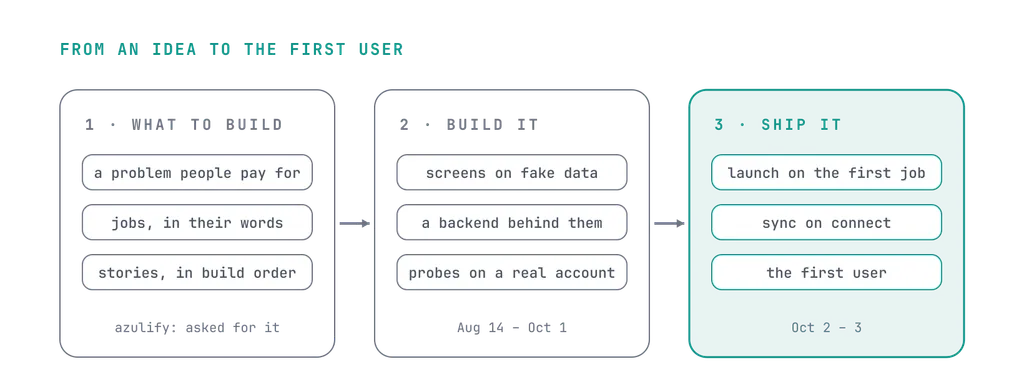
My idea with this post is to show the real process I went through, from finding what to build to getting real users, and I’ll show the dates of my commits backing it up, so you see what I was doing and prioritizing at each point.
The product I’m talking about is azulify, a tool that shows Brazilian Amazon sellers how much each sale left them after everything Amazon takes. The first commit was on August 14 and the first seller connected their Amazon account on October 3. That’s 51 days, but I only committed on 26 of them, 330 commits in total, so this was definitely not a month of full-time work.
Finding what to build
To start building something, you need to know what you’re even building. To build something useful, something people will want to use, you need to make their lives easier somehow, but not in just any way. You need to solve a problem they care about enough to spend money (or time) not to have. This usually means solving something they are already trying to solve somehow, preferably something they are already spending money on.
The best possible case is having people ask you to build something they’ll pay for. Then all you need to do is make sure you can build it, that the market is large enough (not just the person asking you for it), and that you can make money off it (the cost to run is less than what people will pay you). This is what happened with azulify, but it’s almost never the case.
The usual approach means researching, talking to people to understand their problems, and finding out a bunch of things, like whether your customer has money.
But we’re indie hackers, and we don’t have that kind of time. What we can do instead is ask Claude (or something like it) to search Reddit, or the relevant niche places, for things people pay for and what they complain about. This is the approach I use the most.
If you’re using the FastroAI template, you already have skills for that. But let’s assume you don’t. You can do the same thing with any assistant that searches the web, you just need a decent prompt, something like:
Search Reddit and [niche forums] for posts from [type of business] in the last 12 months where people complain about [area]. For each complaint, tell me what they are trying to do, what they use today, whether they pay for it and how much, and link the post. Group the complaints by problem and sort the groups by how many posts each one has.
Don’t just trust the summary though, open the posts and read them yourself. One angry thread can look like a trend once the AI summarizes it, and what you want is the same complaint showing up over and over, ideally from people already paying for something that only half solves it.
In azulify’s case I didn’t even need this, since people came to me asking for it, but the seller forum confirmed what they were saying: sellers complaining that Amazon is obscure about their finances, and that they can’t tell how much a sale left them.
It was one person, and they were already paying for a similar tool. To make sure it wasn’t just them, I looked at the other businesses in the same space, and there were enough of them to tell me people wanted this.
A few rules of thumb to decide whether what you’re building is worth it:
- Your customer is already paying for a solution
- The market isn’t completely dominated by one or a few companies
- You don’t need a lot of money to run the business
- You can build a solution with things that already exist
- You have access: a way to reach the customer niche
Checking azulify against them:
- Already paying: the person who asked was already paying for a similar tool, and there are paid options like ERPs (Bling, Tiny) and sellerboard.
- Not dominated: there are quite a few options, and none of them owns the market.
- Cheap to run: it runs on a server I already had for another product.
- Built with existing stuff: Amazon’s API has the data, and the FastroAI template already had auth, billing and plans.
- Access: through the person who asked and through seller communities, which in Brazil means WhatsApp, Telegram and Facebook groups.
Deciding what to build first
Now that you have a problem to solve, you need to define what to build. Your user might have a bunch of problems, but you should pick the ones you can solve quickly, to validate whether your product is even worth it in the first place.
A good approach is checking the jobs to be done and the user stories (FastroAI also has skills for them). Jobs to be done is writing what the user wants done in their own words, before thinking about any feature. Looking back at what I built, azulify does five jobs:
- Tell me what each sale left me after commission, FBA, ads, returns and tax
- Tell me if today is going well without me opening a spreadsheet
- Tell me if Amazon paid me everything it owes (deposits matched to sales, missing payouts, held balances, lost units)
- Help me price without losing money
- Give my accountant what they need every month
A job is still too big to build, so you break it into user stories, stuff like as a seller, I want to see what order X left me after every cost, so I know if I should keep selling this product. Then you build them in an order where each story only depends on things that are already there, and you can see the order I built them in right in the commits:
| Order | Story (as a seller, I want…) | Built |
|---|---|---|
| 1 | to see what each sale left me | Aug 15 |
| 2 | my Amazon sales imported automatically | Aug 16 |
| 3 | the tax for my Simples band counted | Sep 3 |
| 4 | a view of today’s sales | Sep 7 |
| 5 | the numbers to match what Amazon charged | Sep 14 |
| 6 | to use it from my phone | Sep 24 |
| 7 | to invite my accountant | Sep 26 |
| 8 | my account to sync the moment I connect it | Oct 3 |
| 9 | an alert when a payout is missing, and an export for my accountant | Oct 9 |
| 10 | Amazon’s fees audited against its published table | Oct 10 |
The part I’d copy is how I started building: a frontend mock for the user stories, reusing the FastroAI frontend, with fake data and nothing behind it. Once the mock was done, I connected it to the backend to make it a real product. You can see it in the commits on August 15: the profit screens on fixtures first, then the backend behind them, then the profit engine. When you build the screens first you find out exactly what the backend has to return.
Stories 9 and 10 are from job 3, and I left them for after launch on purpose: job 1 alone is already useful for a seller, so they could wait. My notes for that list are titled “what to build while Amazon decides”, because the app is still waiting on Amazon to approve some API roles.
What sellers already do
You also need to research the other products: what is the user already doing? For azulify there were six things sellers were using, and azulify has a comparison page for each: spreadsheets, Seller Central itself, ERPs like Bling and Tiny, sellerboard and Gestor Seller.
The spreadsheet is the real competitor here. It’s free, the seller controls it, and it works fine until the fee table changes, the Simples band moves or you need to match a payout against dozens of orders by hand. Those three moments are where azulify needed to be better, because a longer feature list means nothing if the spreadsheet still wins in the day to day.
It also helps to look at what ranks on Google for your problem. For azulify, the articles stopped at Amazon’s fees, and nobody was taking a sale all the way through the tax to what’s left.
One rule I kept for the comparison pages: only say things about the other product that someone can check.
Looking at the competitors, I thought I could deliver a better user experience, and I also read what people were complaining about or asking them for, which went straight into the stories.
Understanding the problem well enough to build it
Once you know what to build, you need to understand the problem well enough to compute it. For azulify that meant writing down every rule between the buyer paying and the money reaching the seller: commission, FBA fees, tax, payout cycles, and each one had details I only found when I looked closely.
You can write all of that down and still get it wrong, so two weeks after the first commit I wrote scripts to probe a real seller account. August 30 had 23 commits, the most of any day until the deploy on September 28, and what I found changed the design: in mid-September I moved all the order money from numbers derived from Amazon’s reports to Amazon’s transaction ledger, the record of what was charged and paid. That touched the core of the product, and it happened before launch, with no real user’s data to migrate.
And it doesn’t stop at launch. The day after the first user I had to fix a fee in two blog posts and everything calculated from it, and later I found a fee Amazon had added months before that none of my calculators had.
The 51 days, phase by phase
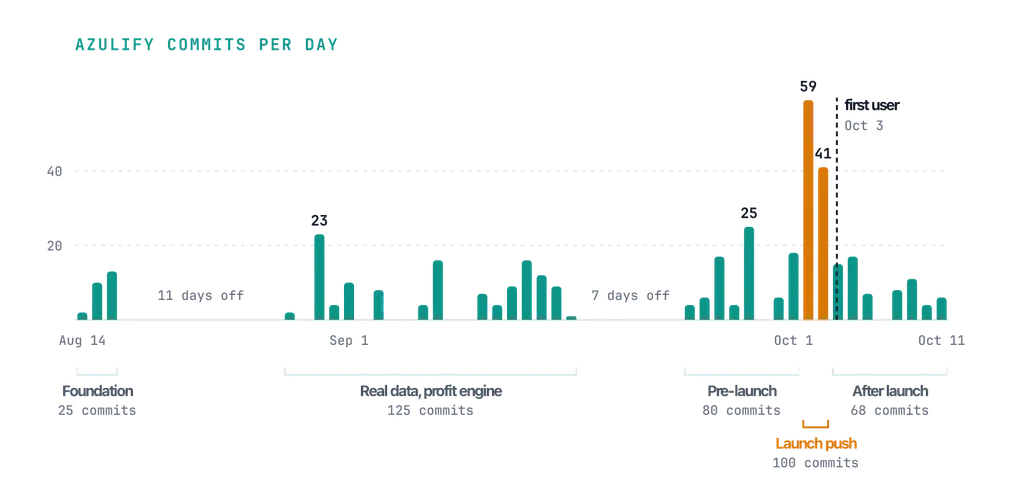
As you can see, it wasn’t a steady month of work. There’s an 11-day gap in August and a 7-day gap in September with zero commits, and 100 of the 330 commits before the first user happened in the last two days. Also, 61% of all my azulify commits were made between 9 pm and 4 am, so yeah, most of this was built at night.
| Phase | Dates | Commits | What went in |
|---|---|---|---|
| Foundation | Aug 14-16 | 25 | Accounts, Login with Amazon, the profitability screens and the profit engine |
| Real data and the profit engine | Aug 28-Sep 16 | 125 | Real-account probes, fee estimation, the Simples tax, the day view, the ledger change |
| Pre-launch | Sep 24-Oct 1 | 80 | Phone layout, plans, legal pages and emails in Portuguese, accountant invites, production deploy |
| Launch push | Oct 2-3 | 100 | Billing, pricing, demo store, feature and comparison pages |
| After launch | Oct 4-11 | 68 | Calculators for the blog, missing payouts, held balances, the fee audit |
The first commit was a Mercado Livre connector (plus accounts and marketplace connections), because I already had some Mercado Livre code from something else I built. The next day I switched to Amazon to validate with the first customer, and I didn’t touch Mercado Livre again before launch.
On September 12 the code structure stopped working for me, so I split the “profitability” module into nine smaller ones, one per concern, and on the 13th I did the same with the frontend, which became 13 features. The refactor took a day, and two days later came the ledger change.
What I didn’t build
You’ll notice none of the stories are about logging in or paying with a card. That’s because azulify started from the FastroAI template (v0.4.0), 98,958 lines in 894 files that already handled sign-up, login and payments, and around 95% of those lines are still in azulify today. On top of that I wrote 58,995 lines of product code, 21,872 lines of tests and 46 migrations, which became 14 backend modules the template doesn’t have (orders, payouts, fiscal, catalogue, today and some others) and 12 frontend features.
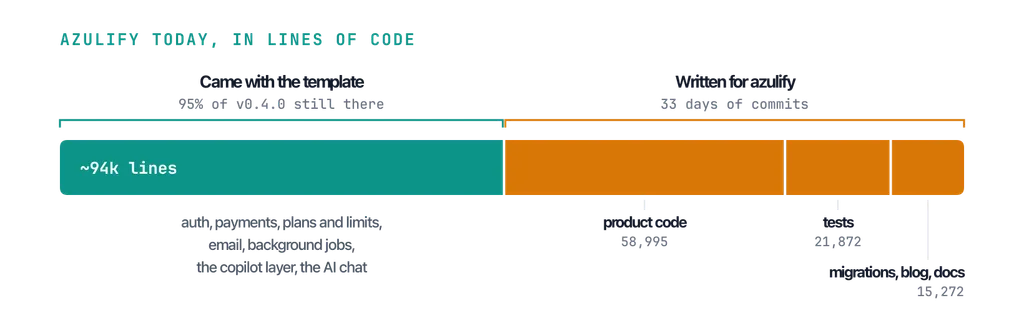
Here’s what I used from it:
| Part | Lines inherited | Still there | How azulify uses it |
|---|---|---|---|
| Payments (Stripe) | 9,174 | 97% | Sells the four paid plans, monthly and annual |
| Entitlements and tiers | 6,477 | 98% | Carries each plan’s order limit |
| Auth | 4,597 | 93% | Sign-up, sessions, Google sign-in |
| Email and notifications | 4,462 | 94% | Same templates, translated to Portuguese |
| Background jobs | 325 | 100% | The scheduler and the sync every 20 minutes |
| Copilot layer | 9,222 | 99% | Extended with azulify’s own data map |
| AI chat agent | 6,965 | 99% | Kept, shipped switched off |
| Admin panel | 1,365 | 34% | Removed |
I also deleted stuff: the admin panel, template screens a seller would never need and the template’s “we build amazing AI products” copy. The AI chat agent is still there, but switched off, since no story needed it.
Where it saved the most time was pricing. azulify has a free tier and four paid plans limited by orders per month, and since plan limits are just entitlements, the plans went in with one commit on September 25, and wiring them to Stripe checkout took a few more during launch week.
It also went the other way: Google sign-in through crudauth’s OAuth router and the Stripe tax code on products were built for azulify first and then added back to FastroAI. And just for comparison, the template took about 11 months and 97 days of commits to get to v0.4.0, while azulify took 26 days of commits to get its first user.
Launch and the first user
October 2 had 59 commits and October 3 had 41, touching 536 files, and very little of that was product. It was everything a seller needs to see before trusting you with their Amazon account: billing in Portuguese wired to Stripe, plans and prices on the site, screenshots, a demo store, feature pages, comparison pages, and swapping the template’s copy for azulify’s.
Right before the first user I also made accounts sync the moment they’re connected and then every 20 minutes, so a seller sees their numbers right away instead of waiting for a scheduled job.
The first seller connected that same day. By October 5 their account had 11 products in azulify, 10 with costs filled in, and since Amazon doesn’t have product costs, the seller typed those in themselves. The Amazon app was (and still is) a draft in Amazon’s Appstore, so the first user connected through the beta version.
And the first user was the person who asked for azulify in the first place.
If you’re starting your own
What I’d do again:
- Turn the problem into a question with a number as the answer, like “what did this order leave after every cost?”
- Test what you think you know against real data in the first couple of weeks; the probes are the reason the ledger change happened before launch
- Find out what people use today and beat it where it breaks, which for azulify was the spreadsheet whenever fees or the tax band changed
- Write the jobs in the user’s words, break them into stories, build in dependency order and launch as soon as the first job works
- Mock the frontend for your stories first, with fake data, and only then connect it to a backend
- Don’t spend your first month on login and billing, start from something that already has them. With FastroAI, azulify’s first story was already about profit, and plan limits were just an entitlements setting